
Connect your Instagram account
Bring Instagram DMs, story replies and comments into the same inbox — two settings in the Instagram app first, then one sign-in. About 5 minutes.
Before you start
- A plan or the free trial is active.
- The account is Professional (Business or Creator). In the Instagram app: Settings and privacy → Account type and tools → Switch to professional account.
- “Allow access to messages” is ON. In the Instagram app: Settings and privacy → Messages and story replies → Connected tools → Allow access to messages. With it off the account connects and looks fine — but no DM ever arrives.
1.Open Settings → Channels → Instagram account
Expand Instagram account and check the two requirements listed under “Before you start”.
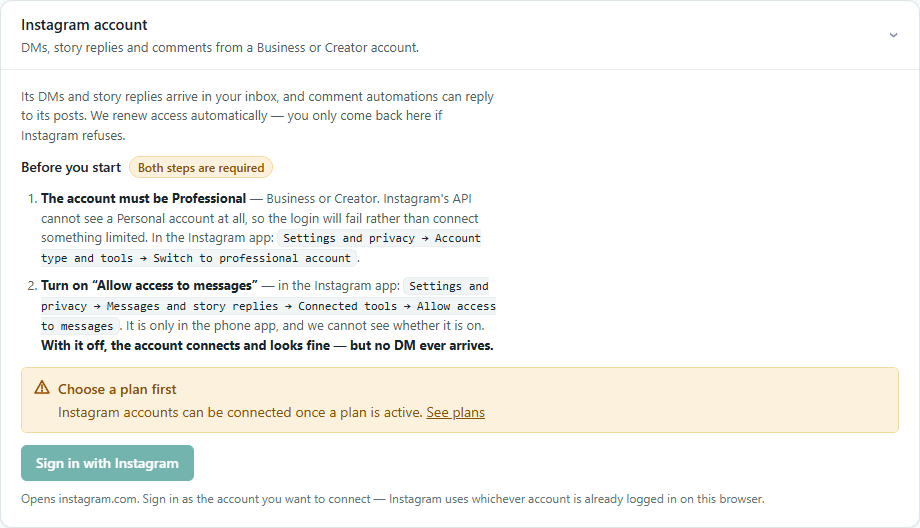
2.Press “Sign in with Instagram”
Instagram opens. Sign in as the account you want to connect (Instagram uses whichever account is already logged in on this browser) and allow the permissions it asks for.
3.Send a test DM
From another Instagram account, send a DM. It appears in Inbox. Remember Instagram's rules: you can reply within 24 hours of the customer's last message, one private reply per comment, and no cold DMs.
If something goes wrong
Connected, but no DMs arrive
“Allow access to messages” is off in the Instagram app — it is only in the phone app. Turn it on; new DMs arrive from then on.
The login fails
The account is Personal. Switch it to Professional (Business or Creator) and try again.